What is Caching A Cache is Just a temporary storage that keeps recently used data handy so that you can get it much faster next timea look at an example here. And consider the difference in speed between where data usually lives in a database and where it can live in a cache. And so, accessing data from disk, like an SSD in the case of a database, takes about a millisecond on average. Accessing data from memory or RAM on the other hand takes about 100 nanoseconds. This is roughly 10,000 times faster. Now, that gap adds up really quickly when you’re serving thousands of requests per second. And caching takes advantage of that big differenceIt keeps copies of frequently used data in a faster layer, often times memory, but not always. We’ll talk about that later on. So, that systems don’t have to reach all the way back into that slower source every single time. So, you have the basic idea. Caching trades a bit of storage and complexity for speed. Now, the next question is, where should you cache your data? And there’s a few different layers in your system where caching can live, each of which have their own set of trade-offs, of course.
Where To Cache
External caching
First one, and by far the most common in system design interviews, is called external caching. This is where you introduce a dedicated caching service like Redis or Memcached. It runs, importantly, on its own server and manages its own memory, and it’s totally separate from your application or your database, right? It’s your own component in the system here. And so, when your application needs data, it first checks the cache. If the data is found there, that’s a cache hit, and it returns your data instantly, super fast. If it’s not there, we call that a cache miss, and it has to fall back to the database, fetch the data, and it stores a copy of that data back in the cache, and also returns it back to the client, right? Uh now, the nice thing here is that in a scaled system, which might have multiple application servers like we represented here, all of these different application servers can share that same external cache. This way, once one server has fetched and cached the data, the others can all reuse it instantly instead of all hitting the database separately, right? Because this is a global view. It’s a global cache that’s shared by all of the different application servers
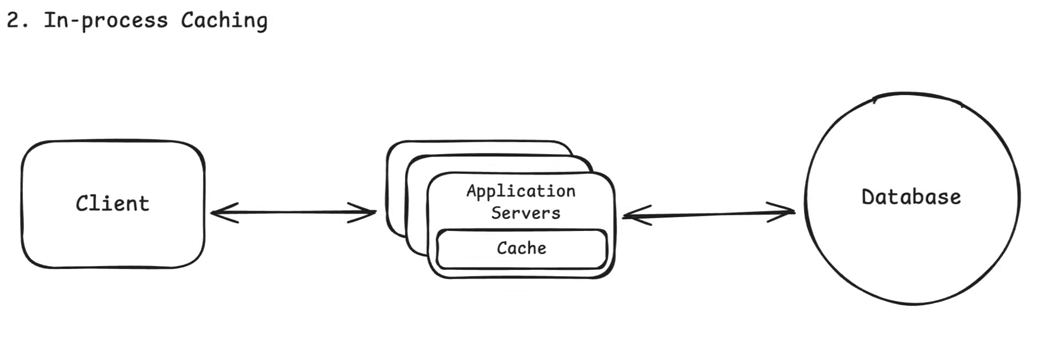
In-process caching
In-process caching lets you skip the complexity of adding something like Redis entirely. Uh it’s often overlooked, to be honest, and I think in real system design outside of the context of interviews, it’s probably overlooked more than it should be, but it can be incredibly effective. Now, the key thing to note here is that modern application servers usually run on really big machines nowadays that have plenty of memory. And you can actually use some of that memory in order to cache data right inside of the process. Uh this is important because it’s by far the fastest kind of caching, right? You don’t have to go and have an expensive network hop here to hit some external cache anymore. The data is already sitting in the same memory space as your application, right? So, you don’t have that expensive network hop, it’s already right there where you want it. But of course, this this comes with trade-offs. And the main trade-off is that unlike the external cache, each application server has its own in-process memory. And so, this means that if one server caches something, the others won’t see it. So, you can end up with these inconsistencies or even wasted memory if you’re not too careful. And so, the chances are, at least in the context of a system design interview, that you probably won’t need to bring this up unless you’re talking about a low-level optimization or have a use case where ultra low latency matters. For example, if you need to cache config data or small lookup tables that every single request depends upon, then caching within the application server makes sense, but your default should remain as External Caching
CDN
we have what are called CDNs or content delivery networks. And so, a CDN is a geographically distributed network of servers that can cache content closer to your users. And I know that that sounds fancier really than it is. It’s just putting servers around the world so that they’re close to the people who need them. Here, we’re not optimizing for the difference between memory and disk speeds like we were before. Instead, we’re optimizing for network latency. So, without a CDN, every single request has to travel all the way to your origin server. If you had a server in Virginia, like was the case here, think that this is S3 or some blob storage, right? And your user is all the way over here in Australia, then this round trip could take 300 to 350 milliseconds. That’s huge, especially when we’re talking about disk access being just 1 millisecond. With a CDN on the other hand, that same request might hit an edge server that’s just a few miles away, which may be 20 to 40 milliseconds round trip, which is a huge difference. Now, the way that it works is that when a user requests something like an image, that request goes to the nearest CDN edge server like we just said. And if that image is already cached there, it’s returned immediately. Perfect, that’s the happy case, that’s the cache hit. If not, if it’s a cache miss, then the CDN itself goes and fetches that media or whatever you’re looking for from uh your origin server, like S3 or whatever blob storage you have, and then it’s going to return that back to the CDN. The CDN will then cache it so that it has it for next time and return it back to the client. Now, modern CDNs, and this is something people often times forget, they can do a lot more than just cache static media, which is what they’re most known for. They can also cache public API responses, of course HTML pages, run edge logic even to personalize content But as far as a system design interview goes, the most common and the most impactful use case to bring up is on media delivery. So, things like images, videos, or static assets, files, etc. that you want to load really quickly around the world. And so, if you have global users who are accessing media regularly, then a CDN is probably a great fit for you.
Client side caching
we have what’s called client-side caching. So, this is when data is stored directly on the user’s device, either in the browser or the app, which avoids unnecessary network costs. Um So, in web apps, that might be something like the HTTP cache or local storage within the browser itself. For mobile apps, this could be data kept in memory or even written to the local disk on device. And it’s nice cuz it’s obviously super fast. Data never leaves the device. But it comes with the downside, of course, and that’s that you have less control over it. Data can go stale, validation, freshness, all of that is a bit harder. And so, when it comes to your interview, you’ll see this come up a lot less often. Um usually, it’s only relevant when your system involves some offline functionality or client-heavy workloads. For example, if a browser’s reusing images it already downloaded, or an app like Strava caching your run data locally while you’re offline and then syncing it once you’re reconnected. We have a problem breakdown where we do exactly that. But for all intents and purposes, this is the least important for you to know as it pertains to your system design interviews.